 The tenth wallpaper symmetry group uses rotations of 90 and 180
degrees to tile the plane.
The tenth wallpaper symmetry group uses rotations of 90 and 180
degrees to tile the plane.
 To construct a p4 tiling beginning with a tile like that shown on the
left, do 90 degree rotations about the red corner (upper right), and
180 degree rotations about the yellow corner (lower right).
To construct a p4 tiling beginning with a tile like that shown on the
left, do 90 degree rotations about the red corner (upper right), and
180 degree rotations about the yellow corner (lower right).
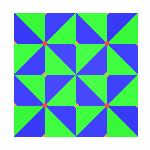 A p4 tiling is symmetric under two- and four-fold
rotations. To see this, imagine rotating the entire tiling 90 or
180 degrees about any red or yellow point, respectively. The rotated
tiling will match up with the original perfectly, which is just what it
means to have rotational symmetry.
A p4 tiling is symmetric under two- and four-fold
rotations. To see this, imagine rotating the entire tiling 90 or
180 degrees about any red or yellow point, respectively. The rotated
tiling will match up with the original perfectly, which is just what it
means to have rotational symmetry.
 By rotating the
original tile three times about the red point, we can construct the
square shown on the right. Using the just
href="p1.html">translation (i.e. the first symmetry group p1) we can
tile the plane with this new square. It is easy to see that this new
tiling will match the p4 tiling shown in the animation above.
Therefore, p4 tilings are symmetric with respect to
translations as well. This is just another way of saying that
this is a periodic tiling. By rotating the
original tile three times about the red point, we can construct the
square shown on the right. Using the just
href="p1.html">translation (i.e. the first symmetry group p1) we can
tile the plane with this new square. It is easy to see that this new
tiling will match the p4 tiling shown in the animation above.
Therefore, p4 tilings are symmetric with respect to
translations as well. This is just another way of saying that
this is a periodic tiling.
Kali denotes this symmetry by "442". You can go to  now to experiment with symmetry p4. now to experiment with symmetry p4.
|