|
Points, lines and polygons are the building blocks out of which
most computer animations are built. Thus, in order to make an
animations, the place to start is figuring out how to animate a
polygon, say a triangle.
Perhaps the easiest way of drawing a triangle is to start with the
three corners or vertices, and connect them with line
segments. Computers keep track of the location of points by recording
their coordinates. Therefore, one might use something like the
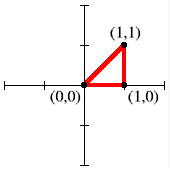
instructions on the left to tell a computer to draw the triangle on
the right:
|
Triangle instructions:
draw line from (0,0) to (1,0)
draw line from (1,0) to (1,1)
draw line from (1,1) to (0,0)
|
|
So far so good, but how do we tell the computer to move the triangle?
Well, we need to give the computer coordinates for three more points,
and intruct it to erase the old triangle, and draw a new one at the
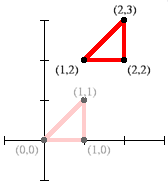
new location. Sometimes, this isn't so complicated. For example, to
move the triangle up and to the right, we might add 1 to the first
coordinate and 2 to the second coordinate of each point:
|
Shifted triangle instructions:
draw line from (1,2) to (2,2)
draw line from (2,2) to (2,3)
draw line from (2,3) to (1,2)
|
|
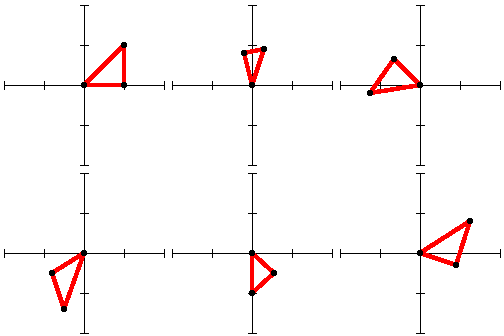
But, if we want to do anything more complicated, like rotating our
triangle, we are going to end up doing some math. If you just try to
do it by hand, picking coordinates by trial and error, it will a) take
forever, and b) come out bad. Here, for example, is a first attempt to do
it by hand:
Next: Tricky Transformations in "Toe the Line"
|